The BTAR Is Back! BTAR 3000 - More Than Just A Keyboard
The BTAR Is Back!!!
BTAR 3000 - More Than Just A Keyboard
Created: 2005. Last Updated: March 8th, 2021. Another timewaster from BenHammond.Tech
Originally conceived as an interface for a “band-in-box” type project in 2003, the BTAR has since grown into a midi controller, synthesizer, drum machine, multi-effects pedalboard, digital bass guitar with “flick” add-on, mic to MIDI converter, and all kinds of hybrid combinations. Central to the design is the idea that the average user can download a simple program for free to their home or classroom computer and access the majority of the functionality, enabling them to create music and improvise at any time.
I. Installation Requirements
There are really no installation requirements for the BTAR, simply double-click the icon labeled “BTAR3000.EXE” and rock on. There are some special externals that you will for the BTAR to be fully functional. For questions on these devices, refer to their specific help manuals.
REQUIREMENTS:
- A Computer Running WINDOWS XP (Mac version coming soon)
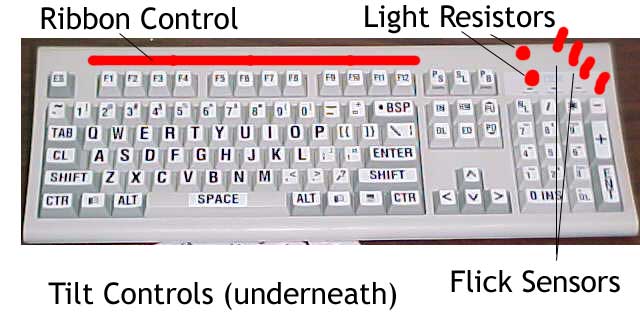
- A Computer Typing Keyboard, preferably with the additional number keyboard on the right hand side. Wireless is coolest, but not required.
- Speakers or Headphones, connected to the speaker out jack on your computer (unless your computer has built in speakers).
- (Optional) Microphone, either external or built in. HINT: you can plug headphones into the microphone jack and talk/sing into the left earphone.
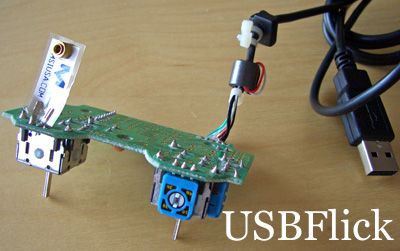
- (Optional) USB Flick. You probably don’t have one of these.
II. BTAR Setup
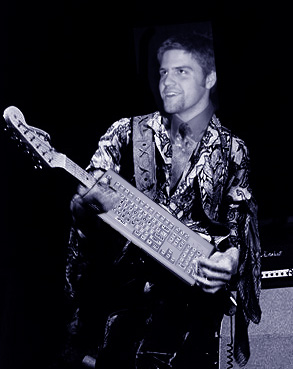
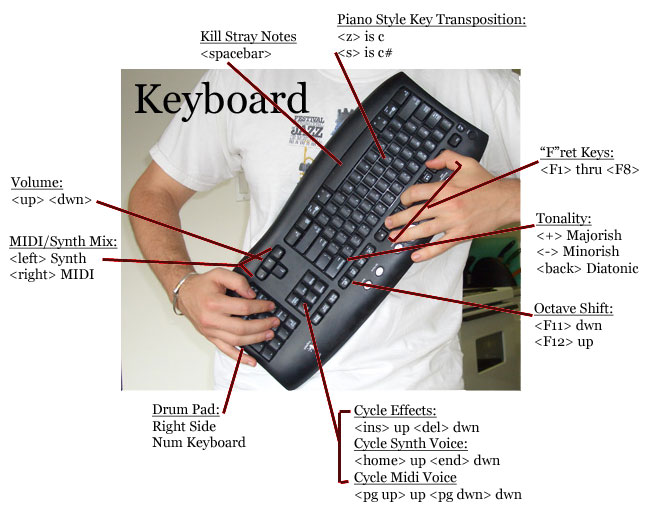
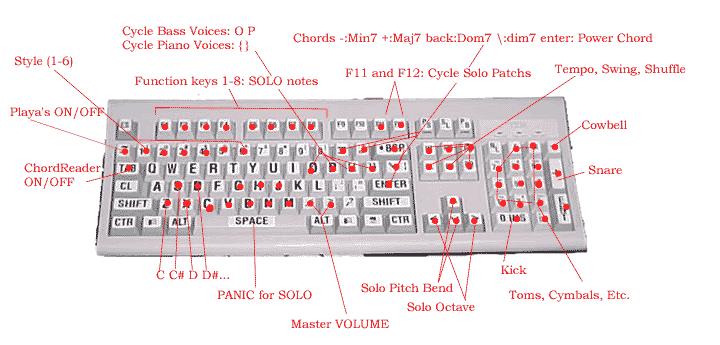
The BTAR 3000 is designed to be easy to play right out of the “box”. There are multiple preset modes available, simply press the numbers “1” through “9” to enter a preset mode. To hold the BTAR, place the bottom of the computer keyboard flat against your stomach, with the fingers of your left hand laid on the function keys, and your palm of that hand supporting the weight of the top, directly opposite the “Q”.
Your right hand will control functionality and / or drums. For drum playing, lay your right thumb on the right hand keyboard’s “0” key (bass drum), index finger on “4” (hi hat), and pinky on ”+” (snare).
You can tie a string from the little leg things that help the keyboard angle and use it as a guitar strap to aid in rocking out.
III. BTAR Basic Playing Technique
-
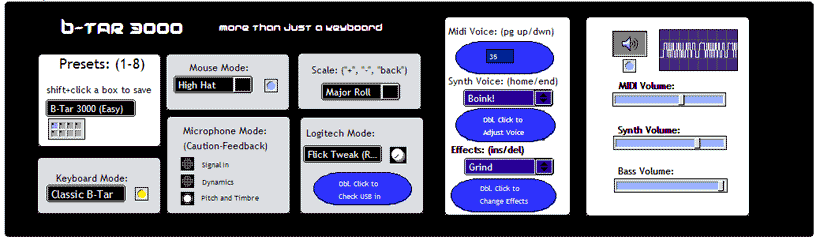
The F1 – F8 keys are mapped to an easy scale. You chose which scale with
- ”-” Minor Pentatonic-ish
- ”+” Major Pentatonic-ish
- “back” Diatonic (Major)
-
The F11 and F12 keys are mapped to octave shift up and down.
-
The letters, starting with “z” and going diatonically up through “m” form a piano style keyboard to transpose the key of the Function keys.
-
The number keys, as mentioned previously, are assigned to preset playing modes.
-
The number keys on the right hand side of the keyboard form a drum pad.
-
The arrow keys control the volume.
- UP / DOWN adjusts the overall volume
- LEFT / RIGHT adjust the blend between MIDI and SYNTH
-
The Space Bar kills all midi notes.
-
The TAB key toggles the MICROPHONE SIGNAL IN mode.
-
The ~ key toggles the STACK mode in the delay pedal. When on, new synth sounds are stacked, or will continue looping. When off, you can play over pre-looped sounds without adding to the looping sound.
-
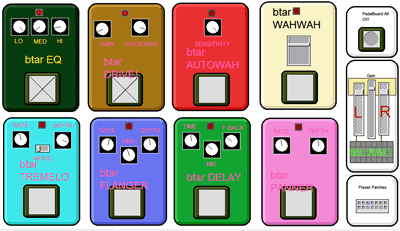
INS and DEL cycle up and down through the EFFECTS PEDAL presets.
-
HOME and END cycle up and down through the SYNTH VOICE presets.
-
PAGE Up / DOWN cycle up and down through the MIDI voices.
IV. BTAR Advanced
Advanced functionally in the BTAR 3000 includes:
- “ALIVE” mode (#2), in which sound received by the microphone is analyzed in terms of timbre and pitch, and then the BTAR creates more sound based on the information, which is in turn analyzed, creating a feedback loop that is sure to entertain.
- “LOOP” mode (#8), in which synth sounds are constantly looped, giving you almost unlimited sonic opportunities. Try experimenting with the MIC SIGNAL IN and MIC TIMBRE PITCH modes while looping. Also, try looping a pattern, turning stack off so that what you play is not looped, and then double clicking on the pedal board and turning on the overdrive pedal, and then soloing over your loop.
- “MIC SIGNAL IN” mode, in which sounds picked up by your microphone enter the SYNTH VOICE chain, thereby being affected by t he pedal board settings.
- “MIC TIMBRE PITCH DETECTION” mode, which is the front part of the ALIVE mode, described above.
- Midi note hang trick. Holding down sustained midi note (like strings for example), shift the octave without releasing the key, and then release, notice how the sustained note will continue holding. The trick can be continuously used to create large synth pads, and can be muted by hitting the
.
V. BTAR Open Source
If you have created anything you value using the BTAR, please send it my way and I’ll feature it. I retain rights to the idea of instrument in its current form, but the music is and always will be yours. If you are interested in contributing to the BTAR project, the source if available on my GitHub . I am currently undertaking a massive overhaul, with the end goal of having a React frontend controlling a BTAR engine playable on any modern device.