Force LinkedIn to Refresh a Cached URL
Force LinkedIn to Refresh a Cached URL
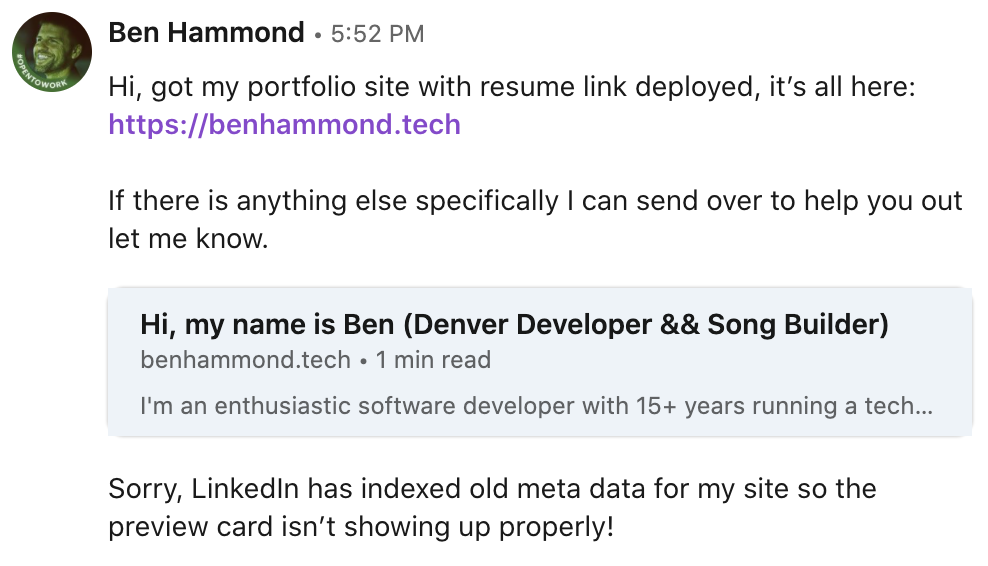
Appending any query to your posted link will trigger a new index of the previously shared site’s meta data. Cached with old data:
benhammond.techForce new data:benhammond.tech/?getMYdataPLEASE
Last week I applied to my first ever software engineering role, and in preparation I finally launched my new developer portfolio benhammond.tech. I am obviously excited to share with the world, and to have a single, branded link to send to contacts as part of my job search. Imagine my horror upon responding to my first interested recruiter and seeing the meta data in the LinkedIn card preview showing “Unknown Developer” and “Lorem Ipsum” for the description!
I dove a bit deeper into the Gatsby portfolio template I had forked from cobidev and discovered an entire section of meta data info I hadn’t filled in that would be populated using
On break at my gig, I resorted to the ole’ Google to solve my problems, and stumbled unto a blog post on LinkedIn itself demonstrating an old and a new way to fix this very issue. The new way was 3 years old, involved going to a special linked in card preview page to check the appearance of your shared link, and of course did not work for me. On my second gig break, I read further on the blog past and found the working solution: append your previously shared URL with any query, and it will trick LinkedIn to thinking it’s a new site and will force it to go and index the data. Apparently LinkedIn will cache shared URL data for up to a week, and in my case https://benhammond.tech was still showing the old data, despite having been updated hours before. I simply tried sharing https://benhammond.tech/?code (although it could have been /?projects or /?hireme or anything not yet shared). It worked! The new fancy data was shining through, and better yet, all of the previously shared cards that had bad meta data were automatically updated to display the correct data! Next step is to insert a fancy graphic!
While you’re here, feel free to connect with me on LinkedIn !